Unlocking the AI Power in Google Maps: How to Enable and Use Next-Gen Features?

 19.08.2026
Navigation is undergoing a massive transformation. Google Maps has evolved from a simple turn-by-turn navigation app into an intelligent urban assistant powered by Gemini and Generative AI. Beyond finding the fastest route, you can now simulate real-time weather and traffic conditions in 3D, get instant camera-based place insights, and ask complex conversational queries to discover new spots instantly.
Whether you are using iOS or Android, here is your step-by-step guide on how to activate and master these cutting-edge AI tools worldwide.
How to Enable Google Maps AI Features
While many AI tools are built into the app by default, unlocking personalized and advanced features requires configuring a few essential settings:
- Update to the Latest App Version: Features like augmented reality (AR) search and conversational AI require the latest build. Make sure to update Google Maps via the Apple App Store or Google Play Store.
- Enable Location & Activity Permissions: For AI to deliver hyper-local and personalized recommendations, location services must be active. Additionally, go to your Google Account Settings > Data & Privacy > Web & App Activity and turn it ON so the AI can tailor suggestions based on your preferences.
- Join Search Labs / AI Experiments (Optional): To test unreleased experimental AI features early, tap the Labs (Experiments) icon inside the main Google app to enroll in preview groups.
Top AI Features in Google Maps and How to Use Them
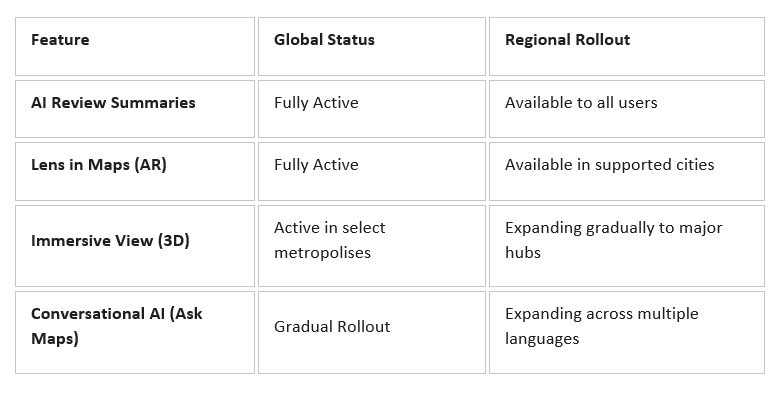
Conversational Search with "Ask Maps"
Instead of searching with rigid single keywords, you can now type or speak complex, natural-language requests just as if you were talking to a friend.
- How to Use: Tap the microphone or AI icon in the search bar and say something like: "Find a cozy coffee shop nearby with outdoor seating, good parking, and live music." The AI analyzes millions of user reviews, photos, and merchant data to curate a tailored list.
Lens in Maps (Augmented Reality Search)
Use your smartphone camera to overlay real-time digital information onto the physical world around you.
- How to Use: Tap the Google Lens (Camera) icon next to the search bar. Point your camera down the street, and AI will display floating tags over surrounding businesses, showing ratings, opening hours, price ranges, and crowd levels in real time.
Immersive View for Routes
Preview your trip using a photorealistic 3D model generated by AI combining aerial images and Street View.
- How to Use: After setting a route, tap the Immersive View preview card at the bottom left. The AI simulates predicted weather conditions, sun angles at different times of the day, and traffic density before you even leave home.
AI-Powered Review Summaries
Skip reading through hundreds of individual customer reviews.
- How to Use: Open any business listing, and the AI will summarize thousands of customer experiences into concise tags and key takeaways, such as "Fast Service," "Quiet Atmosphere," or "Limited Parking."
Global Feature Availability Overview