Freedom in Game Development: Godot Engine

 09.03.2025
For those who are just starting out with game development, the question “Which game engine should I use?” is very important. Many beginner developers tend to lean towards Unity or Unreal Engine. The main reason for this is popularity. These engines are indeed powerful in many ways. However, they also come with some drawbacks. The biggest issue is licensing. Unity requires a premium subscription once your revenue exceeds a certain threshold. Unreal Engine, on the other hand, demands a commission fee after reaching a specific revenue. Moreover, you cannot modify the engine’s source code since they are proprietary products. This is exactly where Godot Engine comes into play.
Godot Engine is a completely open-source (MIT licensed), free game engine. Thanks to the MIT license, you can modify and edit Godot’s source code however you like, and even use it for commercial purposes without royalties.
Godot Engine System Requirements
One of the most important aspects of a game engine is its system requirements. If your device does not meet them, the engine might not run at all, or it may perform poorly. This is where Godot Engine has a huge advantage. Its requirements are so low that, figuratively speaking, it can “run on a toaster.”
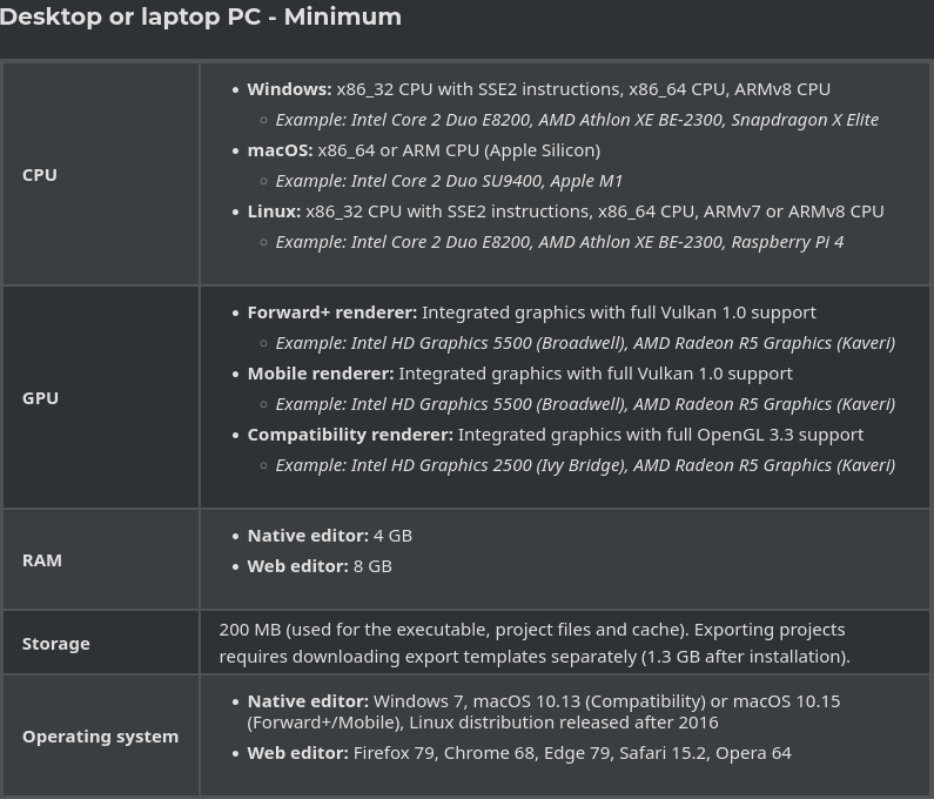
Compared to other engines, Godot’s system requirements are extremely light. For example, Unreal Engine requires a powerful graphics card. Godot, on the other hand, asks for much less. The engine itself also takes up very little space. For instance, the standard Windows version is only around 60–70 MB. Even if you install Export Templates (packages required for building), it still won’t exceed 2 GB.
Device Support
One detail in the Godot documentation might catch your attention: Godot also supports mobile devices! You can develop with it on both Android and iOS. This feature makes it stand out from many of its competitors. With Godot, you can develop games not only on your PC but also on your tablet or even your phone—anytime, anywhere.
Installation and Creating a New Project
- When you visit the official Godot Engine website, you’ll be greeted with a simple interface.
- Click “Download Latest” and select the version that matches your operating system.
- On the download page, you’ll find two versions:
- The standard version (supports only GDScript)
- The .NET version (supports both GDScript and C#)
- If you plan to use C#, download the .NET version. Otherwise, the standard version will be enough.
- The file comes as a ZIP archive. Extract it to any folder and open the executable. You’ll see the following screen:
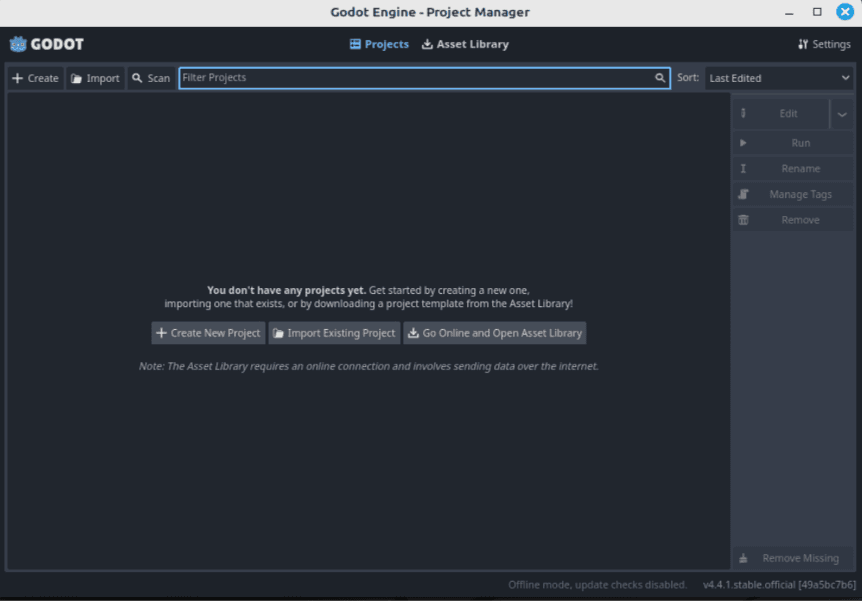
- Click “Create New Project.” The engine will ask for a project name and the location where you’d like to save it.
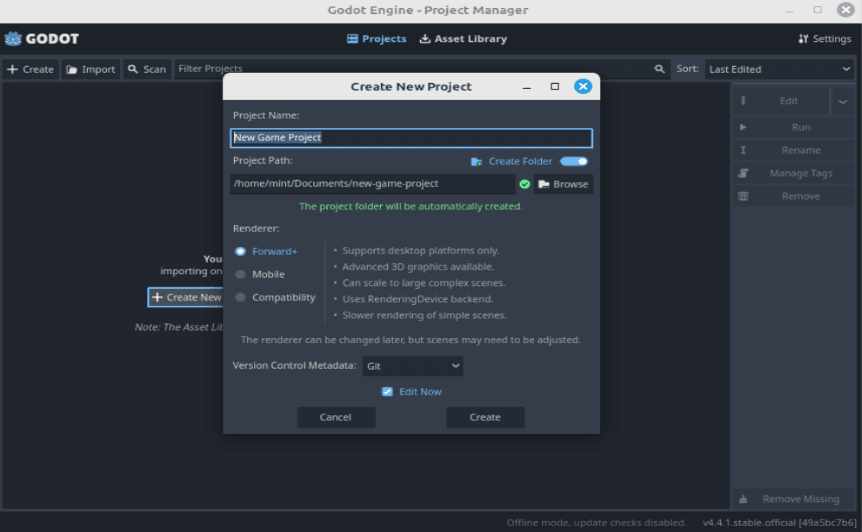
Here, you’ll also notice a section called “Renderer” with three options: Forward+, Mobile, Compatibility.
- Forward+ and Mobile use the Vulkan API (a modern open-source graphics API).
- Compatibility mode uses OpenGL or WebGL (older APIs).
The key thing to remember is that Vulkan works better on newer devices, while older ones may lack Vulkan support. Choose accordingly, then hit “Create.” Your project is now ready, and you can start developing with Godot Engine!
Which Programming Languages Can You Use?
As mentioned earlier, Godot offers two main programming languages by default:
- GDScript (very similar to Python)
- C#
GDScript has always been the default scripting language for Godot, while C# became officially supported with Godot 3.0 (2018). Other languages, such as C++, can also be used, but these are mostly supported by the community. This means you may face limited resources or potential compatibility issues.
GDScript, however, is easy to learn. Like Python, it is a high-level language, indentation-based, and type annotations are optional (types are automatically inferred if not specified). More importantly, it integrates seamlessly with Godot’s core concepts such as the scene system, nodes, and signals.
Godot’s built-in code editor is also very convenient, offering code completion, syntax highlighting, and debugging tools.
Official Documentation and Learning Resources
There are plenty of English resources available for learning Godot, though Turkish resources are still limited. For this reason, working with English materials is highly recommended.
Official Resources
English Resources
Turkish Resources
And that brings us to the end of this article. We’ve covered what Godot Engine is, how to install it, and its key features. If you’d like to see more, I share additional Godot-related content and simple projects on my GitHub organization.
Thank you for reading! Now it’s your turn—start creating games with Godot Engine!